
Teleporting Essentials
A plethora of chat commands for users and admins to teleport + more (Home, Spawn, Locations, RTP, etc)
About Teleporting Essentials
Join the Discord!
Epic Discord Server with updates
Teleport Essentials (TPE)
A comprehensive Hytale plugin that provides teleportation features including homes, random teleportation, public locations, and player-to-player teleport requests.
Commands (players)
/home [name] - Teleport to your saved home (default or named)
/sethome [name] - Set your home at your current location (optional name)
/sethome <x> <y> <z> - Set default home at specific coordinates
/sethome <name> <x> <y> <z> - Set a named home at specific coordinates
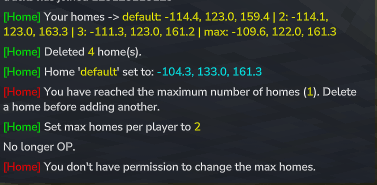
/homes - List all of your homes with coordinates (message is private)
/homewipe [name] - Delete a specific home or all homes (no name = delete all)
/rtp - Randomly teleport to a location for exploration
/location <name> - Teleport to a public/admin-defined location
/locations - See all available public locations
/tpr <player> - Request to teleport to another player
/tpa - Accept the most recent teleport request sent to you
Features
Multiple Homes: Players can set multiple named homes (configurable limit)
Random Teleportation: /rtp command for exploration with safe location finding
Public Locations: Admin-defined teleport points for all players
Player Teleport Requests: Request and accept teleportation between players
Flexible Home Management: Delete specific homes or all homes at once
Cooldown System: Configurable delays to prevent teleport spam
Persistent Storage: All data saved across server restarts
Unified Messaging: All commands use consistent "[TPE]" prefix
Admin-only Commands
/sethome max <number> - Set the max homes per player (0 = unlimited). Requires OP group permission.
/homecooldown <seconds> - Set the cooldown between home teleports (0 = no cooldown). Requires OP group permission.
/location set <name> [<x> <y> <z>] - Save a public teleport location (defaults to your current position)
/location remove <name> - Delete a previously saved public location
Installation
Download the JAR
Place it in your server's mods/ folder
Restart your server
Data Storage
Homes are saved in: plugins/Snipr_HomePlugin/homes.txt
Max homes setting is saved in: plugins/Snipr_HomePlugin/maxhomes.txt
Home cooldown setting is saved in: plugins/Snipr_HomePlugin/homecooldown.txt
Public /location entries are saved in: plugins/Snipr_HomePlugin/locations.txt
Each player can have multiple homes (subject to the max homes setting) that persist across server restarts. The RTP command generates random coordinates within configurable bounds (default: 500-5000 blocks from spawn).
⚠️ Important: Permissions Setup
By default, Hytale prevents non-Operators from using slash commands. For regular players to use this plugin, you must add the permission node to your server's permissions.json file.
Note: You must STOP your server before editing this file, or it may reset your changes.
Configuration
Locate permissions.json in your server root and add the permission string to the default group list.
Correct Syntax: Ensure you use a List [], not an Object {}.
{ "groups": { "Default": [], "OP": [ "*" ], "default": [ "snipr.homeplugin.*", ], "Adventure": [ "snipr.homeplugin.*", ] } Looking for quality hosting?
Categories
Screenshots
Need a Server?
Run Teleporting Essentials on a dedicated Hytale server with easy mod management.
Get Hytale HostingFrequently Asked Questions
What is Teleporting Essentials?
A plethora of chat commands for users and admins to teleport + more (Home, Spawn, Locations, RTP, etc)
How do I download Teleporting Essentials?
You can download Teleporting Essentials for free from CurseForge. Click the "Download on CurseForge" button on this page to go directly to the download page.
Who created Teleporting Essentials?
Teleporting Essentials was created by trackss. The mod has been downloaded 3.2K times.
Is Teleporting Essentials compatible with Hytale servers?
Teleporting Essentials is designed for Hytale and can be used on both single-player and multiplayer servers. Check the mod page on CurseForge for specific compatibility information.
How do I install Teleporting Essentials?
To install Teleporting Essentials: 1) Download the mod from CurseForge, 2) Place the file in your Hytale mods folder, 3) Restart the game. The mod should load automatically.
Related Gameplay Mods
View all mods
Wan's Wonder Weapons
WanMine
A collection of unique weapons for Hytale, new "relics" blending elemental power, dark magic, and a touch of absurdity!

Perfect Parries
narwhals
Adds a souls-like/RPG combat mechanic where if you block at the instant where you are supposed to take damage, you don't lose stamina, deflect some damage, and stun the attacker. This mod includes a stamina system similar to that of souls/RPG games.

Spellbook
DarkhaxDev
Powering your favorite mods with clean, reusable helpers and utilities.

RPG Leveling And Stats/Skills
Zuxaw_dev
An RPG leveling plugin for Hytale that adds experience points, leveling, stat allocation, and character progression with a GUI, HUD, competitive leaderboard system, and full multi-language translation support.

Lucky Mining
Buuz135
Get more ores from mining, the more you mine in a row, the more ores you get.

MMO Skill Tree
ziggfreed
(Multiple Languages) MMO Skill Tree adds an RPG-style progression system where every action you take helps you grow stronger.